ref: http://www.gotw.ca/publications/c_family_interview.htm
You can find the reason why Java does not include unsigned type in the Gosling's comment in the interview with Dennis Ritchie, Bjarne Stroustrup, and James Gosling:
Gosling: For me as a language designer, which I don't really count myself as these days, what "simple" really ended up meaning was could I expect J. Random Developer to hold the spec in his head. That definition says that, for instance, Java isn't -- and in fact a lot of these languages end up with a lot of corner cases, things that nobody really understands. Quiz any C developer about unsigned, and pretty soon you discover that almost no C developers actually understand what goes on with unsigned, what unsigned arithmetic is. Things like that made C complex. The language part of Java is, I think, pretty simple. The libraries you have to look up.
2014년 9월 13일 토요일

2014년 5월 7일 수요일
vi Commands
General Startup
 To use vi: vi filename
 To exit vi and save changes: ZZ   or  :wq
 To exit vi without saving changes: :q!
 To enter vi command mode: [esc]

Counts
  A number preceding any vi command tells vi to repeat that command
 that many times.

Cursor Movement
  h   move left (backspace)
  j   move down
  k   move up
  l   move right (spacebar)
  [return]   move to the beginning of the next line
  $   last column on the current line
  0   move cursor to the first column on the current line
  ^   move cursor to first nonblank column on the current line
  w   move to the beginning of the next word or punctuation mark
  W   move past the next space
  b   move to the beginning of the previous word or punctuation mark
  B   move to the beginning of the previous word, ignores punctuation
  e   end of next word or punctuation mark
  E   end of next word, ignoring punctuation
  H   move cursor to the top of the screen
  M   move cursor to the middle of the screen
  L   move cursor to the bottom of the screen

Screen Movement
  G   move to the last line in the file
  xG  move to line x
  z+  move current line to top of screen
  z   move current line to the middle of screen
  z-  move current line to the bottom of screen
  ^F  move forward one screen
  ^B  move backward one line
  ^D  move forward one half screen
  ^U  move backward one half screen
  ^R  redraw screen (does not work with VT100 type terminals)
  ^L  redraw screen (does not work with Televideo terminals)

Inserting
  r   replace character under cursor with next character typed
  R   keep replacing character until [esc] is hit
  i   insert before cursor
  a   append after cursor
  A   append at end of line
  O   open line above cursor and enter append mode

Deleting
  x   delete character under cursor
  dd  delete line under cursor
  dw  delete word under cursor
  db  delete word before cursor

Copying Code
  yy  (yank)'copies' line which may then be put by the p(put)
     command. Precede with a count for multiple lines.

Put Command
  brings back previous deletion or yank of lines, words, or
 characters
  P   bring back before cursor
  p   bring back after cursor

Find Commands
  ?   finds a word going backwards
  /   finds a word going forwards
  f   finds a character on the line under the cursor going forward
  F   finds a character on the line under the cursor going backwards
  t   find a character on the current line going forward and stop one
     character before it
  T   find a character on the current line going backward and stop
     one character before it
  ;   repeat last f, F, t, T

Miscellaneous Commands
  .   repeat last command
  u   undoes last command issued
  U   undoes all commands on one line
  xp  deletes first character and inserts after second (swap)
  J   join current line with the next line
  ^G  display current line number
  %   if at one parenthesis, will jump to its mate
  mx  mark current line with character x
  'x  find line marked with character x
  NOTE: Marks are internal and not written to the file.

Line Editor Mode
  Any commands form the line editor ex can be issued upon entering
 line mode.
  To enter: type ':'
  To exit: press[return] or [esc]

ex Commands
  For a complete list consult the UNIX Programmer's Manual

READING FILES
  copies (reads) filename after cursor in file currently editing
  :r  filename

WRITE FILE
  :w  saves the current file without quitting

MOVING
  :#  move to line #
  :$  move to last line of file

SHELL ESCAPE
  executes 'cmd' as a shell command.
  :!'cmd'
2013년 12월 2일 월요일
Notepad++ 한글 깨짐 현상 해결
Notepad++를 사용할 때 한글 입력이 깨져서 ㅁㅁㅁ으로 보이는 현상이 발생하기도 합니다. 이것은 편집기의 기본글꼴이 Courier New인데 한글 지원이 되지 않아서 생기는 현상으로 보입니다. 이 문제를 해결하기 위해서는 다음과 같이 하면 됩니다.
Settings -> Style Configurator -> Font Style에서 한글 지원 글꼴(예: 맑은 고딕) 선택 -> "Enable global font" 체크
(설정 -> 스타일 환경설정 -> 글꼴 스타일에서 한글 지원 글꼴(예: 맑은 고딕) 선택 -> "전역 글꼴 사용" 체크)
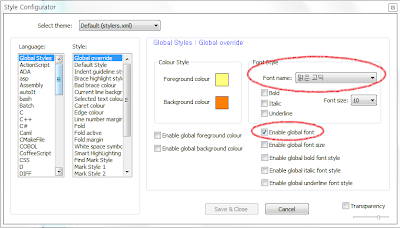
(제 개인적으로 프로그래밍을 할 때는 Courier New와 같은 monospaced(fixed-width) 폰트를 선호하는데요, 한글 깨짐 문제가 발생할 때는 어쩔 수가 없네요.)
Settings -> Style Configurator -> Font Style에서 한글 지원 글꼴(예: 맑은 고딕) 선택 -> "Enable global font" 체크
(설정 -> 스타일 환경설정 -> 글꼴 스타일에서 한글 지원 글꼴(예: 맑은 고딕) 선택 -> "전역 글꼴 사용" 체크)

(제 개인적으로 프로그래밍을 할 때는 Courier New와 같은 monospaced(fixed-width) 폰트를 선호하는데요, 한글 깨짐 문제가 발생할 때는 어쩔 수가 없네요.)
Text Editors
HTML5 편집과 프로그래밍을 하기 위해서는 텍스트 에디터가 필요합니다. 시중에는 많은 상용 소프트웨어와 프리/쉐어웨어들이 나와 있습니다. 상용 소프트웨어를 사용하는 것도 좋겠지만 좋은 프리웨어도 많기 때문에 그 중 몇 가지를 추천드리려고 합니다.
Windows용으로는 제가 추천하는 것은 Notepad++입니다.
그리고, Mac OS용으로는 TextWrangler를 추천합니다.
HTML 전용 editor로는 Kompozer라는 프리웨어도 있습니다. Windows와 Mac OS, 그리고 Linux에서도 사용할 수 있습니다.
WYSWYG(What You See is What You Get) 편집기의 대표적인 프로그램으로는 드림위버(Adobe Dreamweaver)가 있습니다.
Windows용으로는 제가 추천하는 것은 Notepad++입니다.
그리고, Mac OS용으로는 TextWrangler를 추천합니다.
HTML 전용 editor로는 Kompozer라는 프리웨어도 있습니다. Windows와 Mac OS, 그리고 Linux에서도 사용할 수 있습니다.
WYSWYG(What You See is What You Get) 편집기의 대표적인 프로그램으로는 드림위버(Adobe Dreamweaver)가 있습니다.
피드 구독하기:
글 (Atom)